Posts

Showing posts with the label Youtube

Which is the best Video Editor for Youtube Video Making ?

Image
While Youtube has increased their number of users, and also many people are coming and joining to Youtube. Which is great. But what are the recommendation for the video making. I guess you are at the right place to get all the information about the Vlogging. Just sit quite and read the further blog. When I was new at vlogging, i have so much difficulties to get started with it. But when i spent my valuable time behind vlogging, i got golden knowledge about the vlogging. And right now i am making quality based Tech videos. Here is my Youtube Channel : ArkoGeeky  So, today is the topic which video editor is best for new comers in the Youtube. When i created my channel on YouTube i got started with AVS video editor. Yes, the editor was good but not like a pro. So i got switched and started to use Wondershare Filmora. I am making sure that if you find the basic knowledge of it into you, you can make amazing videos for your Youtube channel. Here is the link to download Won...
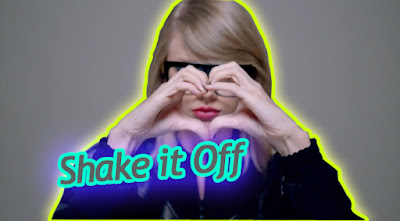
How to add glowing outline to image for Youtube Video Thumbnail

Image
I've watched some videos on YouTube, where I've seen some interesting video thumbnail which attracts viewers. The video thumbnail contains an image from their video, and where the main object appears they adds some glowing outline. When I saw it first time i just clicked on it, but sadly the video was not satisfied for me.  Example : Well today you are going to make an interesting image for Video thumbnail. So, let's do it : Step 1 : In this case i am using the Adobe Photoshop 7.0, even you can use any version of Photoshop. Step 2 : Open the Photoshop. Step 3 : Take the perfect caption from your video, which includes an amazing expression of yours. For this i am taking a video song caption. Hope you don't mind it. Step 4 : Open the image in Photoshop. Step 5 : Now you have to select the portion which suggest an object. Step 6 : To select the portion you can use the Lasso tool, but i am using the Pen tool to select in accurately. Step 7 : Now selec...

How to download Youtube videos without any software

Image
Watching video is very easy thing in Youtube, but when it comes to download the video it becomes quite hard thing. And even sometimes while downloading videos from YouTube, an unexpected thing comes automatically. Don't be worry there are two easy ideas which can change your life : Idea 1 : The first and easy trick is that when you opens the YouTube and watches the video you can see the URL of the video at the Search bar of the browser. And against the youtube.com/----- you have to write ss and then you will go to the other webpage where you can see the Download button. Even you can choose the pixels of the video. And after doing the all things you can download your youtube videos in  a very easy way.   Idea 2 : The second and the easiest way, and even you can download the video at one page. In this step you have to download an extension in your browser. I will recommend you to download easy youtube video downloader express. And it does not requires ...